The [DESCENDANTS] This function is used to retrieve an attribute for all objects within a specific level of an organizational hierarchy, including all its sub-levels.
This function is dynamic; if sub-units are added to or removed from the hierarchy, the list of users returned by the rule will update automatically to reflect the change. This is useful for tasks such as granting access to all users belonging to a specific business area and its underlying departments.
Syntax
The syntax is:
[DESCENDANTS:RootObjectId:AttributeToReturn1:AttributeToReturn2:...]
-
RootObjectId: The internal ID of the top-level organizational unit where the search begins.
-
AttributeToReturn: The name of the field whose value should be returned by the function. You can list multiple attributes separated by colons.
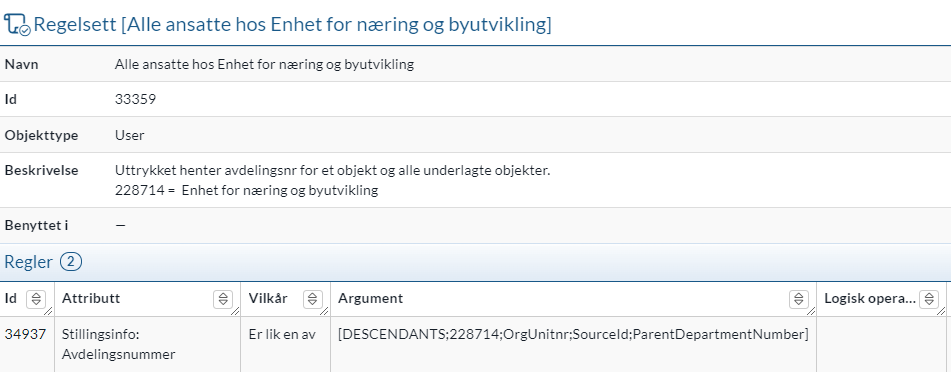
For example, the expression [DESCENDANTS:228714:OrgUnitNumber:SourceId:ParentDepartmentNumber] returns the department numbers for the unit 228714 and all units under it.
Note: Although this expression can be written manually, the Rule Set Wizard in eADM generate it for you with just a few clicks.
Rule example
This rule identifies all users who hold a position in the "Unit for Business and Urban Development" (ID 228714) or any of its sub-units, regardless of whether that is their primary role.